Highlight as you read.
Choose a passage and a color on a webpage or in the PDF reader. Its title and source stay with it.
Your next research folder starts here
A passage to keep. A source to compare. An idea to develop. Excerlo brings them together, from your first highlight to your finished research.
Chrome extension for desktop · Web & PDF
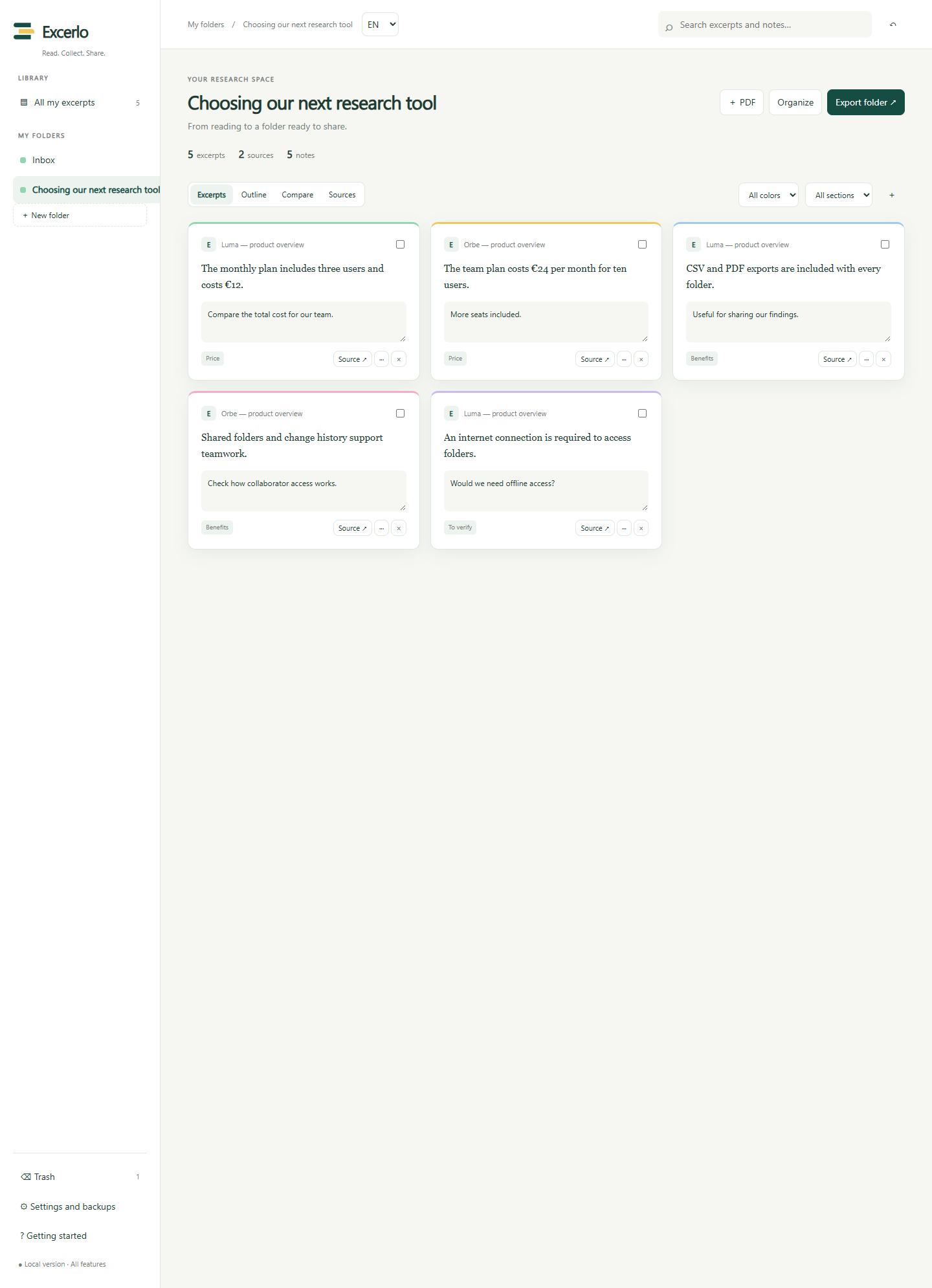
Real Excerlo screenshot · sample folder
Less copying and pasting. More connected thinking.
Choose a passage and a color on a webpage or in the PDF reader. Its title and source stay with it.
Collect excerpts in folders, add your notes and organize them into outline sections.
Find your references and export your work. With Pro, compare sources and prepare a Word document or PDF too.
Excerlo in action
A guided tour of the extension: capture, notes, comparison and export, narrated in English.
Meet Excerlo. Highlight useful passages, keep their sources, and turn your reading into organized research. Let’s see how it works, using two fictional tools.
On a webpage, select the passage you want to keep. Choose a color, a folder, and a section, then click Capture. Your excerpt and its source are saved together.
In your library, find your excerpts and add your own analysis. Your note saves automatically. In Outline view, find your passages grouped by section and write your summary.
Reading more than one source? Compare view, included in Pro, brings their excerpts together by criterion. Here, the prices and benefits of our two examples appear side by side.
Your research is ready. Choose a format and export your work with its notes and references. Markdown and CSV are free. Pro also includes Word, HTML, and a print view you can save as PDF.
To move faster, create a list of words or phrases. Excerlo highlights matches as you read. Use a shortcut to move to the next match, then choose which passages to keep.
Excerlo works in English and French. Your folders stay in your browser, with optional encrypted syncing. Try the interactive demo on our website.
Fictional tools used as examples. Recorded with the local version, which includes Pro features.
Try it yourself
Try a highlight, then follow your excerpt through to export. This demo runs right here on the page.
Illustrative demo with fictional content. No data is sent to the server.
Research notebook · sample article
To compare different places, start with the conditions that matter to you.
Keep your criteria handy. They will help you compare the different options.
Click the outlined sentence to highlight it.
The venue has a quiet room and a Wi-Fi connection.
From research to your next document
Your excerpt, its source and your note, together in a file you can reuse.
A clearer view of your research
A library for your ideas, a view to compare them and a side panel to keep you reading.
Your excerpts, their sources and your notes, together in one folder.
Real screenshots of the local version · sample data · Pro features are listed in pricing.
Straight to the right section
Capture straight into a section with Alt + Shift + 1 through 9. Fewer interruptions to organize useful ideas.
Make your criteria stand out
Create lists of words or phrases. Excerlo highlights the matches; you choose which passages to keep.
Your research stays yours
Your folders are saved in your browser. Work without an account and choose whether to sync between computers.
Room for your ideas
The essentials to collect your research. Pro tools to organize and share more.
Everything in Free, plus:
Billed monthly. Or €9.90 EUR per year, tax included.
Purchases are not open yet. When available, Pro will renew automatically until canceled through the Stripe portal.
The Chrome Web Store listing is being prepared. The install button will link to the official listing when it is available. In the meantime, try the demo on this page or request test access from the team.
Check availability →Excerlo is a Google Chrome extension for desktop. You can browse this page and try its demo on mobile; installing and using the extension requires a computer.
Yes, by opening them in Excerlo’s PDF reader. The PDF must contain selectable text: the extension does not provide OCR for scanned documents. The file stays on your device.
No. Use folders and excerpts locally in your browser. To sync them, create a space in Settings and keep its private connection code safe. This code gives access to your space and should be protected like a password.
Excerpts, notes, sources, folders and keyword lists sync when you enable this option. Data is encrypted on your devices before upload. PDF files stay local and transfer through ZIP backups. Encrypted sync storage is limited to 5 MB on Free and 20 MB on Pro.
Excerlo supports Weava and generic CSV imports with column mapping and a preview. Only information present in the file can be imported. An Excerlo ZIP backup also transfers your PDF files.
Free includes Markdown and CSV. Pro adds Word, HTML and a print view you can save as PDF. Source references stay with your excerpts. Export does not embed annotations into the original PDF.
When subscriptions open, you will be able to access the Stripe portal from Excerlo Settings. Canceling will stop renewal at the end of the paid period. Purchases are currently disabled.
Your next research project starts here
Take a look around. Highlight an idea. See how it becomes a research folder.

Preparing for release
The official Chrome Web Store listing is not available yet. Public installation and subscriptions will open after validation.
Already using the local version?
Find Excerlo in Chrome’s extensions menu, then open your folders from its icon.